A clear table view
Find a table and open its running order without searching through a pile of handwritten slips.
TABLE MANAGEMENT · CHENNAI
A busy dining room should not mean a crowded billing counter. DeccanPro keeps each table’s order together, so the captain, cashier and kitchen can work from the same order.
See it in a demo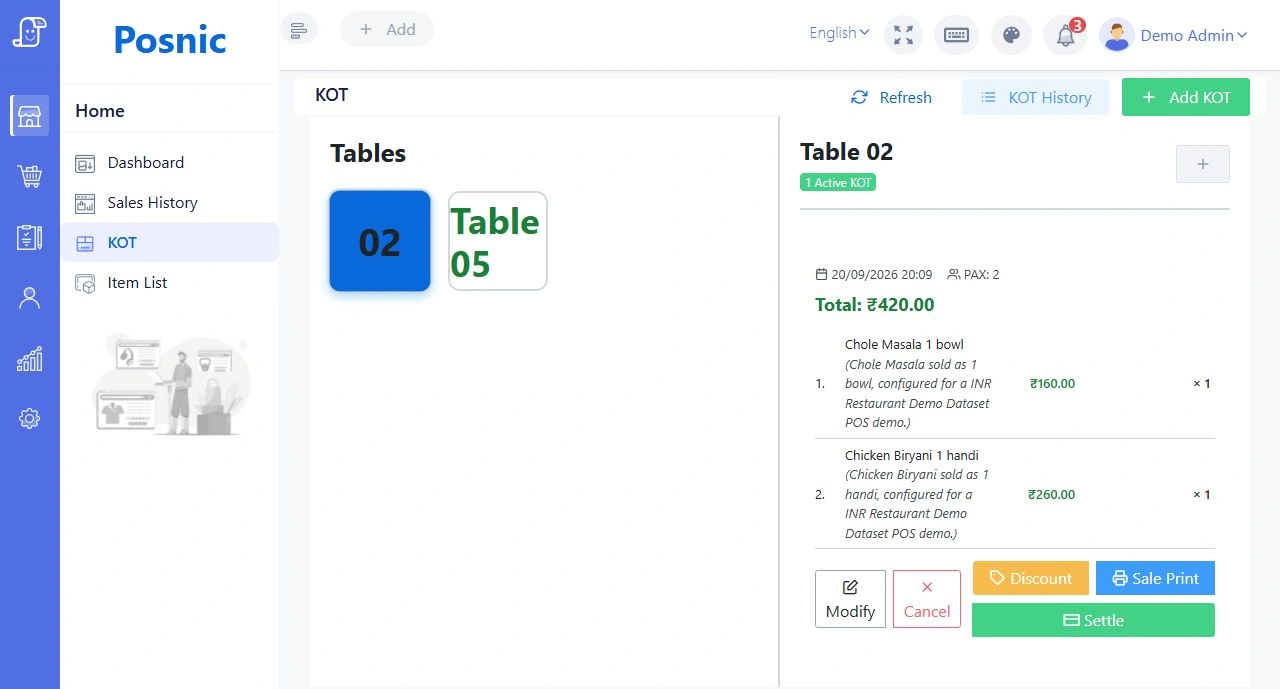
IN EVERYDAY SERVICE
Find a table and open its running order without searching through a pile of handwritten slips.
Add more dishes to an existing table order and send the kitchen the next KOT. Keep the running bill together.
Orders placed through the captain mobile app are associated with the table at the POS.
Review the table’s items at checkout and complete billing from the counter.
PICTURE YOUR NEXT SERVICE
A family orders meals, then adds a dosa and two filter coffees. The captain opens the same table, adds the items and sends the update. The cashier still has one table order to review when the family asks for the bill.
Illustrative workflow, not a customer testimonial.Bring these details to your demo:
BEFORE YOUR DEMO
YOUR QUESTIONS, ANSWERED
Need to talk through your setup?
Call the DeccanPro team
Yes. The restaurant workflow supports subsequent items on a running table order and KOT updates for the kitchen.
Yes. Captain connects to the restaurant’s POS server so floor staff can place orders against the table. The phones need a working connection to that server.
LET’S TALK ABOUT YOUR RESTAURANT
₹6,000 per year. No limits. No setup fees. No hidden charges.