From Mount Road, for Chennai’s restaurants.Let’s talk: +91 94 94 11 11 91

RESTAURANT BILLING · CHENNAI

Restaurant POS and billing software in Chennai

Your billing system should follow the way your restaurant serves food. Manage table orders and counter sales with restaurant workflows connected to the final bill.

See it in a demo
INSIDE THE SOFTWARE

From menu selection to the current order.

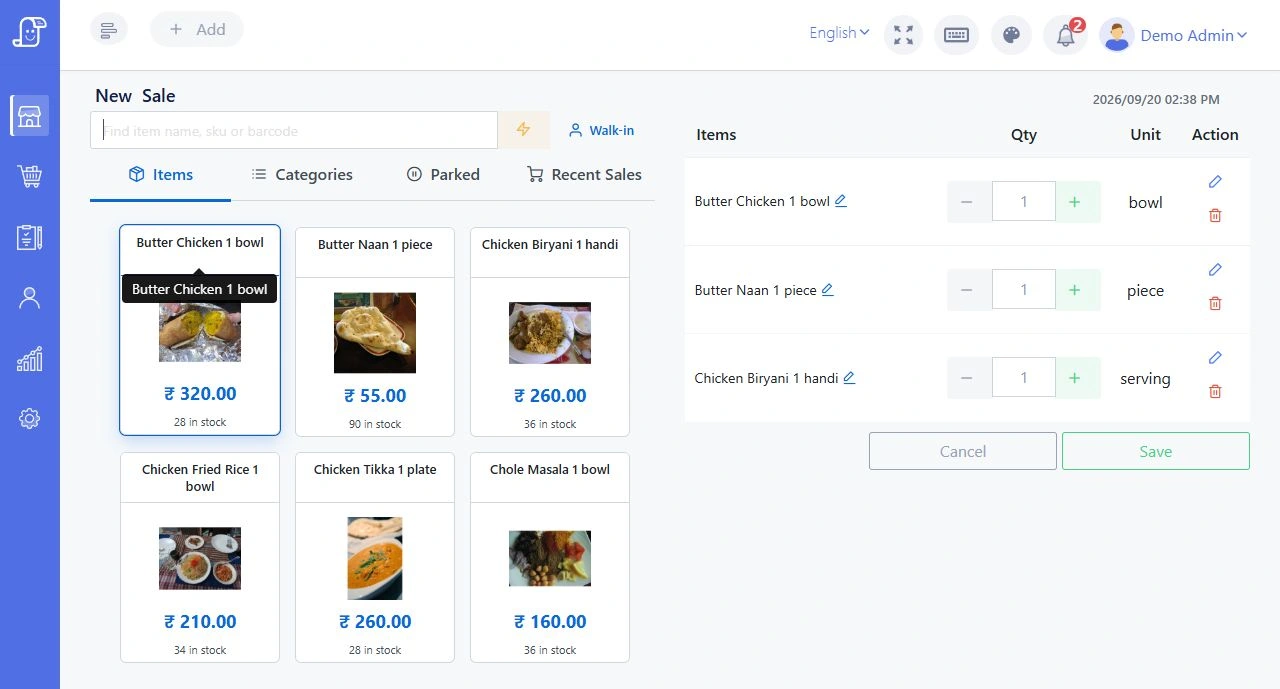
This demonstration shows menu categories, dish prices and the current order beside one another. In your demo, try a popular Chennai breakfast order: select the dishes, change a quantity and review the total before proceeding. Use your own menu to check whether staff can find items quickly.

Software demonstration showing restaurant menu categories, dishes and the current order
Actual software demonstration with sample menu prices and orders, not customer records. Select the image to inspect it at full size. Arrange a demo with your restaurant’s menu and equipment.

IN EVERYDAY SERVICE

Less running around.
More working together.

01

Connected restaurant billing

Review ordered items and quantities before completing the bill, with table orders tied to the restaurant workflow.

02

Configurable tax invoices

The POS supports GST invoice fields, CGST/SGST and IGST configuration and HSN information. Have your accountant confirm the correct settings for your business.

03

Local operation

The core POS and database can run on a shop computer or your own server. Internet is still needed for online payments and other connected services.

04

Sales and stock visibility

Review sales reports and inventory records alongside daily restaurant operations. Choose the reports you need during the demo.

PICTURE YOUR NEXT SERVICE

A familiar restaurant moment.

Your restaurant serves dine-in guests while handling takeaway at the counter. Staff place the orders, the kitchen receives the KOTs, and the cashier reviews the right items before completing each bill.

Illustrative workflow, not a customer testimonial.

Let’s check your setup

Bring these details to your demo:

  • A sample menu with prices and tax settings
  • Your current invoice and receipt format
  • Your computer, printers and restaurant network
Talk it through with us

BEFORE YOUR DEMO

Plan this part of your setup.

Choose restaurant billing software

A practical restaurant billing software selection guide: test five real orders, compare annual costs and record what each supplier demonstrates.

Closing-shift checks

Review open tables, unresolved kitchen tickets, sales records and backup responsibility at the end of restaurant service. A practical staff handover guide.

Restaurant POS first week review

Review the first week of restaurant billing software using observed order issues, repeatable examples, staff feedback and a short prioritised correction list.

Cash and digital split payments

Compare split payments, equal shares and separate restaurant bills. Test cash change, item allocation, saved references and kitchen quantities with worked examples.

Restaurant sales reports explained

Read restaurant item-sales and payment reports with a worked meals-and-coffee example. Check dates, grouping, split payments and cash before comparing totals.

PRACTISE WITH YOUR TEAM

Try a Chennai restaurant exercise.

Choose a worked scenario for this feature. Use your own menu and equipment during the demonstration.

Chepauk

Compare the menu mix across two event-day service windows.

Chetpet

Update an unpaid order after the guest has seen a bill preview.

Nandanam

Confirm a group-lunch revision before it becomes kitchen work.

Royapettah

Reduce an accepted order without leaving the kitchen on the old quantity.

More Chennai exercises (2)

Explore all Chennai locality guides

YOUR QUESTIONS, ANSWERED

A little more detail.

Need to talk through your setup?
Call the DeccanPro team

Can the restaurant POS work without internet?

The core POS can operate locally when the application and database are installed on a shop computer or local server. The local network must work for connected captain devices. Online payments and cloud services may need internet.

How much does DeccanPro restaurant billing software cost?

DeccanPro is ₹6,000 per year at one flat rate. No limits, no setup fees and no hidden charges. Table orders, captain mobile, KOT printing, kitchen display, voice announcements and restaurant billing are included.

Chennai landmarks in an original city illustration

CHENNAI TEAM. YOUR RESTAURANT.

Your next busy service.
A little more under control.

₹6,000 per year. No limits. No setup fees. No hidden charges.

Call DeccanProBook a demo