Table and item details
Print kitchen tickets with the order’s table information, dishes and quantities.
KITCHEN KOT PRINTING · CHENNAI
The kitchen needs to know what to cook, how many and for which table. DeccanPro brings kitchen order ticket printing into the same workflow as ordering and billing.
See it in a demo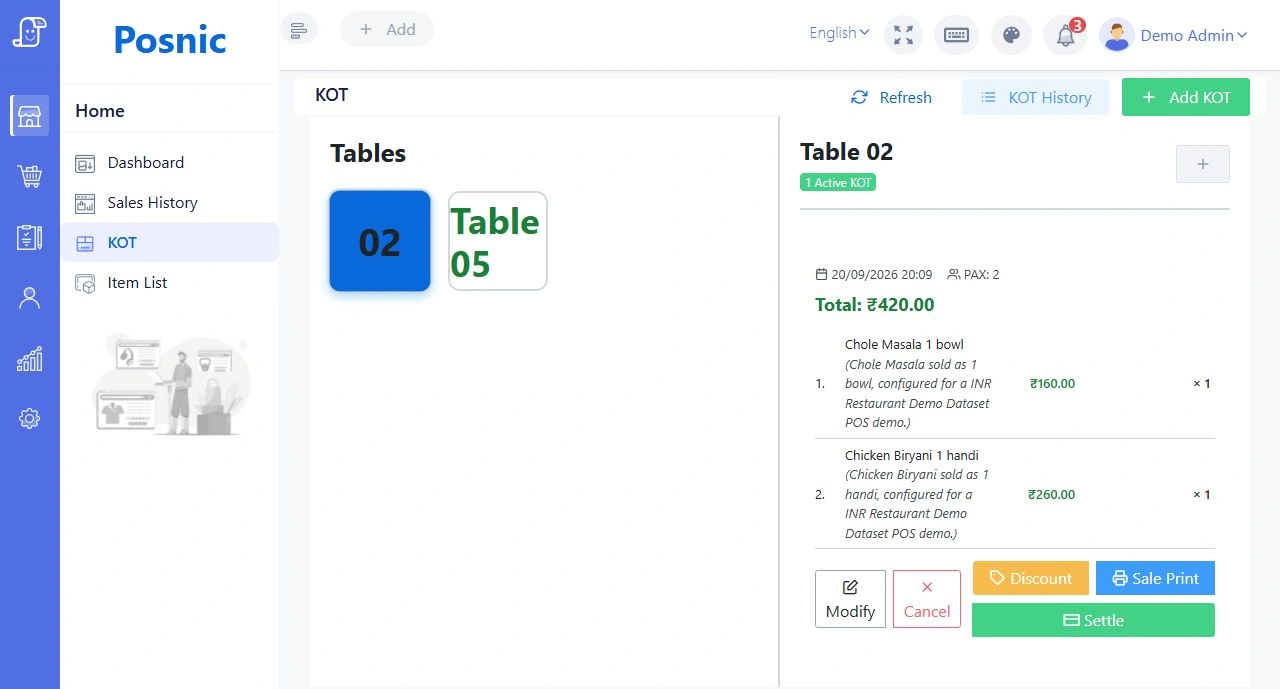
IN EVERYDAY SERVICE
Print kitchen tickets with the order’s table information, dishes and quantities.
Use the KOT workflow for new orders, modified items and cancellations, so a change is treated as a change.
Configure supported printer destinations to suit the restaurant. Confirm your printer model, connection and paper size during setup.
Use printed KOTs alongside the kitchen display and optional spoken announcements.
PICTURE YOUR NEXT SERVICE
A table adds two parottas after the main order. A new kitchen ticket carries the additional items. If an item is cancelled, the cancellation workflow distinguishes it from a fresh order.
Illustrative workflow, not a customer testimonial.Bring these details to your demo:
BEFORE YOUR DEMO
YOUR QUESTIONS, ANSWERED
Need to talk through your setup?
Call the DeccanPro team
KOT stands for Kitchen Order Ticket. It is the instruction sent to the kitchen with the dishes and quantities to prepare for an order.
It may be possible. Share the model, connection type and paper size with DeccanPro so we can check compatibility and run a sample ticket before setup.
LET’S TALK ABOUT YOUR RESTAURANT
₹6,000 per year. No limits. No setup fees. No hidden charges.